Forex live,Comex live&27+Crypto Exchanges Include Binance Live Data in Amibroker with RTQuote Window, visit : www.iwinchart.com
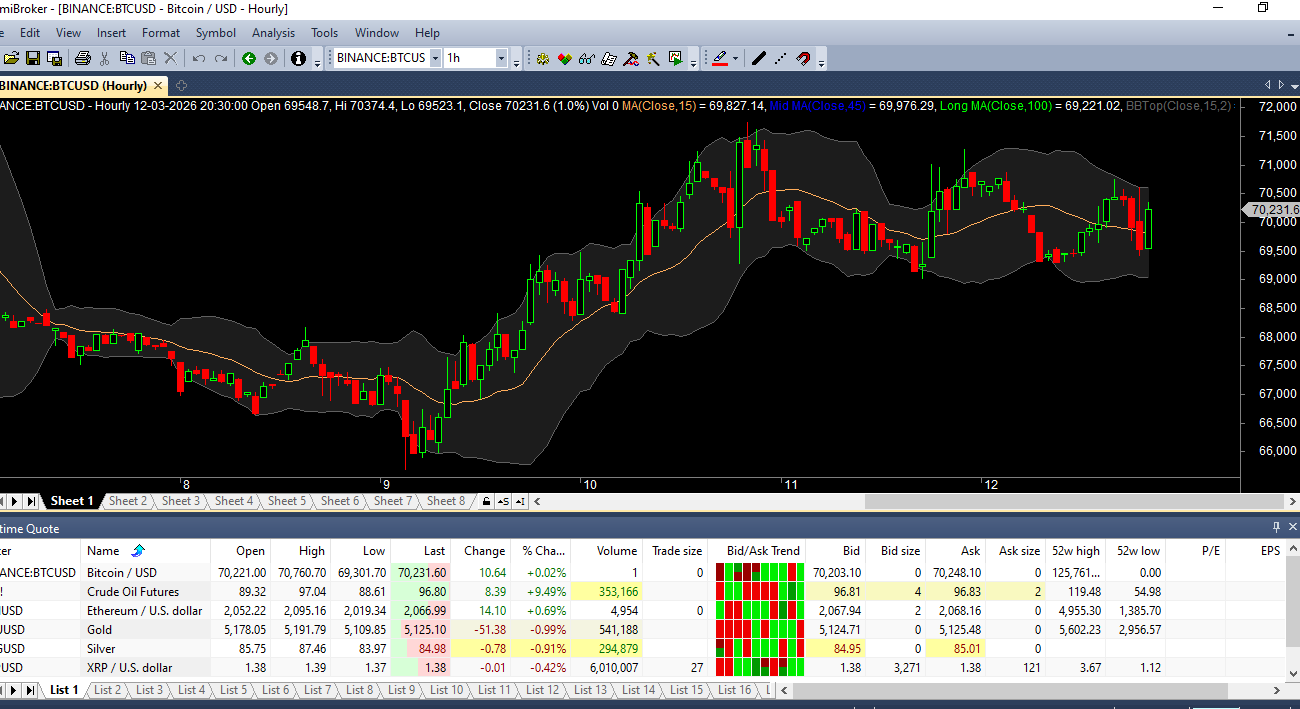
Unlock Global Markets: How to Get Forex, Comex & Binance Crypto Live Data in AmiBroker with RTQuote Window
In the modern trading landscape, limiting yourself to a single asset class is a thing of the past. Successful traders know that opportunities move across borders—from major currency pairs in the Forex market to gold and silver on the Comex (Commodity Exchange), and the high-volatility action of Binance and other crypto exchanges.
However, the biggest challenge has always been getting this data into one place. AmiBroker is widely regarded as the fastest technical analysis software available, but its power is only as good as the data you feed it. If you are juggling multiple platforms to watch Forex, Commodities, and Crypto, you are trading blind.
At iwinchart.com, we provide the ultimate solution. In this guide, we will show you how to consolidate Forex, Comex, and 27+ Crypto Exchanges—including Binance—into AmiBroker and display it all in the powerful RTQuote Window.
The Challenge: Fragmented Data in a Multi-Asset World
If you trade globally, you know the pain. Perhaps you use one platform for Forex charts, another for Comex gold futures, and a web interface for your Binance crypto portfolio. This fragmentation leads to:
-
Delayed Decision Making: You cannot spot correlations instantly (e.g., how a move in the Dollar Index affects Bitcoin or Gold).
-
Inconsistent Analysis: Different tools mean different indicators and timeframes.
-
Missed Opportunities: Arbitrage and intermarket analysis become nearly impossible.
The Solution: iwinchart’s All-in-One AmiBroker Data Combo
To truly harness AmiBroker’s capability, you need a unified data feed. With the iwinchart Combo Pack (TVDataFeed + AmiFeed) , you can finally break down the silos between traditional finance and digital assets .
Here is how we bring the world’s markets into your AmiBroker:
1. Forex Live Data
The Forex market runs 24 hours a day, and you need tick-perfect accuracy. Our feed provides direct access to major, minor, and exotic currency pairs. Because the data is streamlined directly into AmiBroker, you can run your AFL systems on the exact same low-latency data that institutional traders use .
2. Comex Live Data
Commodities are essential for portfolio diversification and hedging. Whether you are trading Gold (GC), Silver (SI), or Copper (HG) futures from the Comex, our data feed ensures that your futures and commodity charts are updated in real-time alongside your other assets . This allows you to monitor dollar strength and commodity prices simultaneously without switching screens.
3. Crypto Exchanges (Including Binance)
This is where iwinchart truly stands out. We aggregate data from 27+ Cryptocurrency Exchanges, with a primary focus on Binance Live Data.
-
Binance Spot & Futures: Get real-time order books and trade data for BTC/USDT, ETH/USDT, and every major altcoin.
-
Multi-Exchange Coverage: Because we pull from 27+ exchanges, you can monitor arbitrage opportunities or simply choose the deepest liquidity for your charts .
Displaying It All: The Power of the RTQuote Window
Once you have the data flowing into AmiBroker, how do you monitor it all? The answer is the Real-Time Quote (RTQuote) Window .
This is your mission control. Imagine a single window scrolling live updates that look like this:
| Symbol | Last | Change | Bid | Ask | Volume |
|---|---|---|---|---|---|
| EUR/USD | 1.0925 | +0.05% | 1.0924 | 1.0926 | 12,545 |
| XAU/USD (Gold) | 2025.30 | -0.12% | 2025.10 | 2025.50 | 1,245 |
| BTC/USDT (Binance) | 43,125 | +2.5% | 43,120 | 43,130 | 12.5K BTC |
| ETH/USDT (Binance) | 2,310 | +1.8% | 2,309 | 2,311 | 45.2K ETH |
How to use the RTQuote Window effectively:
-
Add Symbols: Simply right-click in the RTQuote window or on the symbol tree to “Add to Realtime Quote” .
-
Monitor Correlations: With the iwinchart combo pack, you can watch how a spike in Binance volume correlates with a move in Forex or a shift in Comex Gold.
-
Bid/Ask Trend: AmiBroker’s RTQuote window includes a visual Bid/Ask trend indicator, showing you the momentum of the last 10 trades—essential for crypto scalping and Forex day trading .
Why Choose iwinchart for Your AmiBroker Data?
Setting up multiple data sources in AmiBroker can be technically daunting if you try to do it alone. You have to manage different plugins, symbol formats, and database settings. Getting it wrong means bad backfills or corrupted charts .
When you choose the iwinchart AmiBroker Combo Pack, you are getting a plug-and-play experience:
-
Unified Database: We combine TVDataFeed’s global breadth with AmiFeed’s speed, so your stocks, commodities, Forex, and Crypto all live in one database .
-
Consistent Symbol Mapping: No more guessing if Bitcoin should be “BTCUSD” or “BTC/USD”. Our templates handle the formatting for you.
-
Deep Backfill: You get enough historical data to backtest your multi-asset strategies properly, including intraday data for crypto and Forex .
Start Your 3-Day Free Trial Today
You don’t need to be a programmer to get professional-grade data. You don’t need to pay for expensive proprietary terminals to see Forex, Comex, and Binance on one screen.
Visit iwinchart.com now and activate your 3-day free trial of the Combo Pack. Experience the power of a truly unified AmiBroker setup—with Forex, Commodities, and Crypto streaming live into your RTQuote Window .